
a safety companion that gives you peace of mind when walking alone at night, commuting late, solo traveling & morethe eNO badge uses real-time AI to
autonomously detect and respond
to threats without relying on
human reaction.






AI threat detection
the badge’s AI system reads audio, visual and motion cues to recognise when you’re under threat, and triggers an emergency response on your behalf. you don’t need to press a button or reach for your phone.


automatic emergency response
you’re instantly connected to a trained emergency operator, who can temporarily see your live footage and location, and escalate to the police in seconds. you can talk to the operator directly through the badge.


alerts to friends and family
in an emergency, the eNO badge automatically alerts your chosen contacts and shares your real-time location with them.
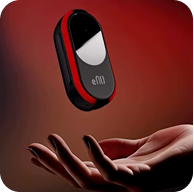
you stay in control
press the button or say the word “eNOugh” aloud to trigger it yourself, even if you can’t reach your phone. the operator will assess the situation before the police are dispatched.
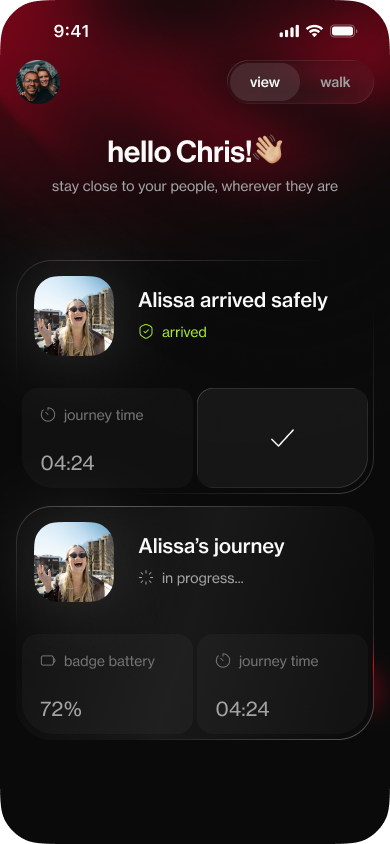
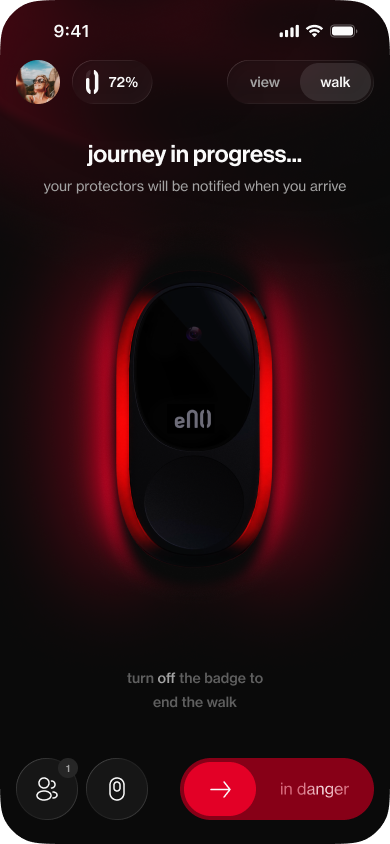
automatic journey notifications
most journeys pass without incident. switch the badge on and your trusted contacts are notified you’ve set off; switch it off and they’re notified you’ve arrived safely. there’s no need to remember to text.

our story
the mission
founders
meet the minds
behind eNO


our ambassadors
the voices helping
shape a safer future

 Abbie@abbiehartley___

 Aneesa@aneesaruns100

 Dorthy@hey.dorthy

 Lauren@lauren_bishh14

 Lotta@skincarewithlotta

 Nada@nadakasbar

 Nishkaa@nishka.x

 Soffia@so.feelings

 Sophia Mantle@sophiamantle
partners and media
where you might have
have heard about us
testimonials
real stories
real peace of mind
“It stayed securely attached to my jacket, I even forgot I was even wearing it.”
“I felt comfortable and safe wearing it.”
“It was that quiet reassurance of knowing I’m not on my own”
“With the badge, I didn't need to be on constant guard.”
“Wearing the eNO badge makes me feel empowered.”
“It’s lightweight to carry, but the security it gives is huge.”
“My late night walk felt relaxing for once. Every girl needs one.”
“My daughter tested it and loved, to me, it gives me calm.”
“I love seeing how latest tech can really make my life better.”
“After a bad experience back in my uni days, the badge is finally making me feel safe.”
“I feel at ease knowing my girlfriend has it when she’s out.”
“It felt like I had on invisible armour.”
limited amount only a few remaining
order your badge today
ends Friday 6 nov 2pm (UK time) or until sold out
first batch closed, last batch remaining
1 month free trial
then £9.99 £14.99 monthly
- 100% refundable until the end of the trial
- shipping in December, only shipping in the UK
- not in the UK?
- secure payment powered by Stripe
- apply
inside eNO



frequently asked questions
everything you need to know
About eNO
What is the eNO badge?
The eNO badge is a wearable personal safety device from eNOugh. When you are on a journey, the badge monitors your surroundings, uses AI to detect threats, and connects you to a trained emergency operator who can assess the situation and quickly escalate to the police when necessary. The badge pairs with a smartphone app, through which the people you trust - your protectors - can follow your journey.
Who is eNO for?
For adults (18+) who want extra protection and peace of mind when out alone: commuters, students, runners, night-shift workers, and those whose loved ones want to know they got home safely.
How is eNO different from a personal alarm or a safety app?
The eNO badge is unique in its ability to trigger an emergency response in situations when you are unable to react. Whereas panic buttons, alarms and safety apps all require you to act in the moment, the eNO badge uses AI threat detection to automatically connect you to a trained operator, who can escalate to the police. The device has its own 4G connection, so you can speak to the operator without reaching for your phone.
Where should I use eNO?
eNO is designed for public areas: walking home, going for a run, moving around town. It is not intended to be worn at home, at work, or in venues such as clubs.
Does the badge work without my phone?
Yes. The badge has its own 4G connection, so it works even if your phone is lost, taken, or out of battery. Your phone is only needed for the companion app, which you use to set up the badge, choose your protectors, and review past journeys.
Which phones does the app support?
The eNOugh app is available on both iOS and Android.
Can I use eNO abroad?
Not yet. The badge works only in the UK: it cannot connect abroad, and our operators can only escalate to UK emergency services. We are, however, working hard to make it available in other countries.
Getting started
How do I set up my badge for the first time?
- Download the eNO app from the app store. You can also use the link on our website or the QR code in the manual.
- Create your account.
- Turn on the badge by holding the ON/OFF button for two seconds. It takes about ten seconds to start up, then vibrates and the light ring fills to show your battery level.
- Pair the badge to your phone over Bluetooth, this will later be automatic once the connection is established. The app will walk you through this.
- Activate your subscription. This connects your badge to the mobile network and the monitoring service.
How do I pair the badge with my phone?
When you first turn the badge on, it may enter pairing mode automatically. If it does not, hold the front ALERT button for five seconds. The status light turns blue and the ring rotates to show the badge is ready to connect. No PIN is needed.
What if my phone's Bluetooth is switched off?
The app will detect this and ask you to turn Bluetooth on before pairing.
Do I need a SIM card or my own data plan for the badge?
No. The badge has a built-in eSIM, and mobile connectivity is included in your subscription. There is nothing to insert or configure.
Can I pair the badge with a new phone?
Yes. Hold the ALERT button for 5 seconds to re-enter pairing mode and pair from the new phone. Re-pairing means the badge re-syncs with your personal subscription through the app. If a different user without a subscription tries to use the badge, it will not work.
Using the badge: journeys
How do I start a journey?
Just turn the badge on. A journey starts automatically and stays active until you turn the badge off. Once on, the badge connects to the mobile network and begins monitoring.
How do I know the badge is working?
The ring shows static red while the badge starts up, then stays on dim red once a journey is active. The status light shows white when the badge is connected to the mobile network. You can also check journey status, connection, and battery in the app at any time.
How do I end a journey?
Hold the ON/OFF button for two seconds, or end the journey in the app; either will turn off the badge. Your protectors are automatically notified that your journey has ended.
Who are protectors and what do they see?
Protectors are friends or family you choose who can follow your journeys in the app. They are notified when a journey begins and ends, and when an alert is triggered and resolved. During an alert, they can see your real-time location. You can invite them from your contacts, by share link, or by QR code. While no threat is detected, your protectors won’t have access to your location.
Do I have to share my journey with anyone?
No. Sharing with protectors is optional. Even without protectors, the badge, the monitoring centre, and the alert system protect you on every journey.
Alerts: what happens in an emergency
How do I manually trigger an alert?
The eNO badge is designed to recognise when you are in danger and trigger an emergency response on its own. However, you also have the ability to raise an alert yourself: press the front ALERT button twice in quick succession, or say the word "enough" out loud.
What exactly happens when an alert is triggered?
The light ring flashes red and the badge vibrates. Video, audio, and your location are livestreamed to a trained emergency operator, and your protectors are notified. The operator assesses the situation within seconds and, if you are in danger, can escalate to the police.
Can I talk to a real person during an alert?
Yes. During an alert, a two-way audio channel opens between your badge and a human operator at the monitoring centre. You can hear and talk to them through the badge itself. No phone is needed.
What if I trigger an alert by accident?
You can cancel a false alarm directly in the app. Because only you can unlock your phone, only you can cancel an alert. If you cannot reach your phone, or the operator has already connected, they will confirm with you and stand the alert down. Your protectors are notified that it was a false alarm.
Can the badge be switched off during an alert?
If the badge is in alert mode, you need to press the ON/OFF button for 5 seconds straight to turn it off. The badge switches off, but the alert stays open: the Alarm Receiving Centre keeps handling it and will try to reach you. The operator may stand the alert down if what they received does not show a clear threat.
What happens if my badge and phone disconnect during a journey?
Your journey continues as normal for as long as the badge has battery. You will receive a notification on your phone, and your protectors will see that your phone and badge are disconnected but that the journey is still active.
What if someone steals my badge?
The badge is designed to pick up signs of aggression or a struggle, so a theft is likely to trigger an alert, which our operators will handle. Please contact us if your badge gets stolen.
How does the AI detection work?
There is AI on the badge itself and in the cloud, together reviewing your environment and predicting whether you are in danger. You always keep the manual trigger (button press or shouting "enough") as well.
The monitoring centre and the police
Who responds when I raise an alert?
Alerts go to a professional Alarm Receiving Centre staffed by trained human operators, 24 hours a day. The operator verifies the situation over the live stream and two-way voice line, then takes the appropriate action.
Do the police actually come?
Yes. If the operator determines that you are in danger, they escalate to the police, who decide whether to send officers to your location. eNO does not replace 999: if you can, call 999 yourself.
How fast does the monitoring centre respond?
When your badge is connected to the internet, alerts will reach the Alarm Receiving Centre immediately, and a human operator responds within a matter of seconds, 24/7.
What happens after a real incident?
Our operators stay with you until the incident is resolved, and your protectors are kept updated throughout.
Is there a penalty for false alarms?
False positives from the badge's AI are not your responsibility. If an alert is raised in error you can cancel it in the app in seconds; the human operator will also be able to verify whether an alert is genuine. If we detect repeated intentional misuse, we reserve the right to review your account and take appropriate action.
Recording and your data
Is the badge always recording?
Yes, while a journey is active. Video and audio are streamed continuously: to the Alarm Receiving Centre if a threat is detected, and otherwise to our secure servers. When the badge is off, nothing is recorded.
What happens to my journey footage?
After your walk ends, your footage is anonymised automatically: we remove any link to you and blur identifying details such as faces and tattoos, both yours and those of anyone else in view. The anonymised data is used to improve the AI that keeps you safe.
Who can access my journey data?
Your protectors do not have access to the footage, and neither do we. Only the Alarm Receiving Centre, and the police where needed, can access it, and only when an alert is raised. Your protectors see your journey status and, during an alert, the location of your phone and badge.
Privacy and GDPR
What personal data do you collect?
Account data (name, email, and phone number), device and technical data (badge ID, battery, and connectivity status), journey data (the audio, video, and location streamed during a journey, which is anonymised afterwards), and subscription data. Full details are in our Privacy Policy.
Is my data protected under GDPR?
Yes. eNOugh Safety operates under UK GDPR and the Data Protection Act 2018, and we are registered with the ICO. You have all the rights the law provides, including access, correction, and deletion.
Can I delete my data?
Yes, you can delete your data by sending a request to our team. Note that all footage is anonymised after your journey, so we cannot trace it back to you in order to delete it.
Battery and charging
How long does the battery last?
About 2 hours of continuous walking on a full charge. That covers plenty of journeys home, but unfortunately you can't run a marathon with it yet. How many journeys you get depends on how long they are, so we suggest charging it after every few.
How do I check the battery?
The app will notify of the badge’s battery life and will remind you when to charge it. Single-press the ON/OFF button at any time and the light ring will fill to show the battery level. The app also shows the badge battery during a journey.
How do I know the badge is charging?
The status light shows red while charging and turns green when the battery is full. This works even when the badge is switched off.
What happens if the battery runs low during a journey?
Both you and your protectors are notified, so a badge switching off is not mistaken for an emergency.
Wearing the badge and hardware
How do I wear the badge?
The badge has a versatile attachment mechanism: it can be secured to your clothing at chest height with either the magnet or the clip. The provided string also gives you the option to wear it as a necklace.
What do the buttons do?
The badge has two buttons. The ON/OFF button on the side powers the badge on or off when you hold it for two seconds; a single press shows your battery level. The ALERT button on the front raises an alert when pressed twice; holding it for five seconds puts the badge into Bluetooth pairing mode. During an alert, you can turn off the badge by holding the ON/OFF button for 5 seconds; the alert stays open with the Alarm Receiving Centre.
What do the lights mean?
The red ring light on the front:
- Static: starting up (about ten seconds)
- Filling: showing battery level, on start-up or a battery check
- Dim red, steady: journey active
- Flashing rapidly: alert in progress
- Rotating: Bluetooth pairing
- Off: badge is off
The small status light next to the ON/OFF button:
- Solid white: connected to the mobile network
- Blinking white: connecting, or unable to reach the network
- Blue: Bluetooth pairing mode
- Red: charging
- Green: fully charged
Is the badge waterproof?
The badge is water-resistant but not waterproof. It is rated IP44, so it can withstand splashes and light rain, but it should not be exposed to heavy showers or submerged. So yes, you can walk under the rain but can’t shower or swim with it.
Support
I have an issue with my badge (connection, internet, Bluetooth, or anything else).
Contact our team and we will support you.
How do I contact support?
Send an email to info@enoughsafety.com.